项目仓库 / Repository: JinghaoW/ManuDiff
在线试用 / Try it online: https://jinghaow.github.io/ManuDiff/
中文 (English here)
简易 LaTeX 正文对比
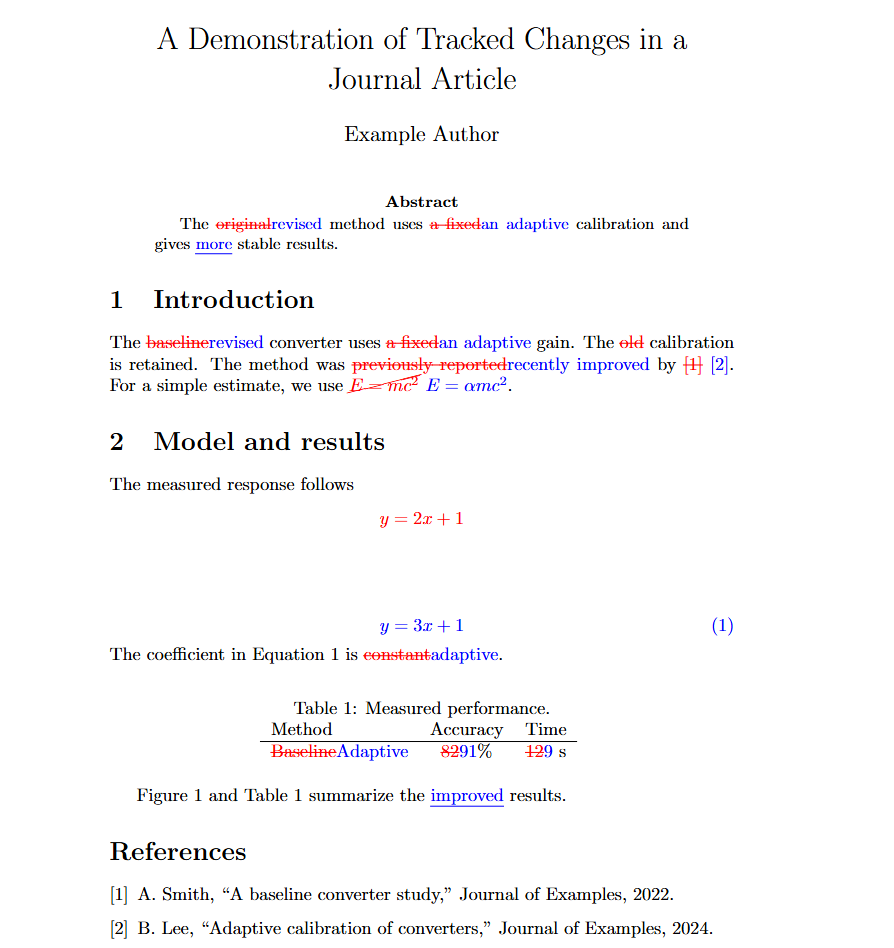
输入旧版和新版 .tex 文件,生成一个带修改痕迹的 .tex 文件。删除显示红色删除线,替换后写入的文字显示蓝色,纯新增显示蓝色下划线。公式、引用、图表也按下述规则处理。
浏览器界面
直接双击打开 index.html,依次选择 Original 和 New 的 .tex 文件,拖动滑条选择 1 到 10 个词以上(默认 1),点击“生成并下载”即可获得 tex_difference.tex。文件在浏览器本地处理,无需安装依赖或启动服务器。
examples/sample_org.tex 和 examples/sample_rev.tex 是可直接上传的演示文件;它们使用同目录下的 figure_org.png、figure_rev.png。examples/tex_difference.tex 是用默认 1 词门槛生成的对比结果。在 examples 目录编译,以便 LaTeX 找到图片文件。
需要安装什么
- 只用浏览器生成
.tex: 无需安装本项目的依赖,也不需要 Node.js 或 LaTeX。 - 运行命令行或测试: 安装 Node.js(官方下载),需要 18 或更新版本。
- 编译生成的
.tex为 PDF: 安装一种 LaTeX 发行版,例如 MiKTeX(Windows 下载) 或 TeX Live(官方安装说明)。不需要两种都装。 - 编译所需宏包: xcolor、ulem、cancel。这些链接是 CTAN 的宏包说明与下载页面;通常通过已安装的 LaTeX 发行版管理宏包。示例论文还使用 amsmath 和 graphicx。
若文档引用了相对路径的图片或文献文件,请把下载的 .tex 放在原项目合适的位置后再编译。
编译后的效果
编译 tex_difference.tex 后,PDF 中旧版删除的文字是红色删除线,替换后写入的文字是蓝色,纯新增的文字是蓝色下划线;其余文字按文档原有样式显示。低于最小修改词数的改动直接显示新版文字,不附加标记。界面中的示例仅用于说明效果,不是对上传文件的实时预览。
在项目目录运行 pdflatex tex_difference.tex,通常会生成 tex_difference.pdf;如果原项目使用 XeLaTeX 或 LuaLaTeX,应继续使用原来的编译方式。
案例图:
公式、引用与图表
- 行内公式(
$...$、\(...\)):旧公式红色划除,新公式蓝色;纯新增的公式为蓝色下划线。整块公式(\[...\]、equation、align、gather、multline)按完整公式对比:旧公式以红色无编号形式显示,新公式保留原编号、标签并显示为蓝色。整块公式不使用下划线,以免破坏公式排版。 \cite类引用和常见\ref类交叉引用:保持命令完整,旧引用用红色删除线,新引用用蓝色,纯新增用蓝色下划线。旧引用键或交叉引用标签若无法在新版项目中解析,编译后可能显示为?。\includegraphics图片命令发生变化时:在 PDF 中显示旧图片文件名的红色提示,保留并显示新版图片,同时标出蓝色提示。图片内容本身不会做像素级比较;旧图片文件不必保留。图题文字和表格单元格中的普通文字继续使用正文的红蓝标记。- 1–10 词门槛仅用于普通文字修改。公式、引用命令和图片文件的变化作为独立修改显示。
- 页面或命令行会对检测到的部分未标记结构变化提示数量,并采用新版内容;该数字不涵盖所有未标记变化,不能代替人工核对。
命令行使用
需要 Node.js 18 或更新版本;生成 PDF 还需要本机的 LaTeX 编译器,以及 xcolor、ulem、cancel 宏包。
1 | node .\simple-latex-diff.js old.tex new.tex --min-words 1 -o comparison.tex |
--min-words 可设为 1 到 10 的整数,默认 1。它表示一处连续修改中,旧版或新版至少涉及多少个词才显示痕迹。低于门槛的修改仍采用新版文字,只是不标记。例如把一个词改成另一个词,在门槛为 2 时不会显示痕迹。
这里的“词”按连续的 Unicode 字母或数字片段统计,不进行自然语言分词;一段没有空格的中文可能只算一个词片段。
省略 -o 时,输出到新版文件旁边的 新版文件名_diff.tex。可用 pdflatex comparison.tex 编译,也可以用原项目所用的其他 LaTeX 引擎。建议在原项目目录中生成输出,以便图片、参考文献等相对路径继续可用。
1 | node --test .\simple-latex-diff.test.js |
范围与限制
- 以新版的导言区和文档结构为基础,只对
\begin{document}到\end{document}之间的普通文字添加痕迹。 - 注释、标签、代码环境与未覆盖的自定义命令通常直接采用新版,不保证在 PDF 中显示痕迹。整幅图表的插入或删除、表格结构与列格式的变化也需要人工检查。
- 不展开
\input/\include文件,也不处理自定义宏中的复杂语法。两版都须是完整.tex文件。 - 生成的
.tex使用cancel、xcolor和ulem宏包。自动测试只检查生成逻辑,没有编译 PDF;请按原项目的方式实际编译并检查复杂公式、引用样式与浮动体。 - 比较算法把词、空白、标点和部分 LaTeX 结构分别作为 token。若两版之间最短的 token 插入/删除操作数超过 1000,工具会报错以限制内存占用;这不是“修改超过 1000 个词”。复杂项目和更广泛的 LaTeX 语法可使用 latexdiff。
这个工具旨在帮助准备带修订痕迹的论文。投稿前,请核对目标期刊的具体要求,并检查最终生成的 PDF。如果觉得工具好用,欢迎给 GitHub 仓库点个 Star!
English
Simple LaTeX Diff for Manuscript Revisions
Compare an original and a revised .tex file and generate a LaTeX document with visible revision marks. Deleted text appears in red with a strikeout, replacement text in blue, and newly inserted text in blue with an underline. The tool also handles selected math, citation, figure, and table changes.
Use the browser interface
Open index.html directly in a browser. Select the Original and New .tex files, choose a minimum word count from 1 to 10 with the slider (default: 1), and click Generate and download. The browser downloads tex_difference.tex. Files are read and processed locally; no server or installation is required for this step.
To try the interface, upload examples/sample_org.tex and examples/sample_rev.tex. Their figure assets, examples/figure_org.png and examples/figure_rev.png, must remain alongside the generated .tex file when you compile it. A pre-generated result at the default threshold is available as examples/tex_difference.tex.
Installation links
- Browser-only
.texgeneration: no project dependencies, Node.js, or LaTeX installation is needed. - Command-line use and tests: install Node.js from the official download page (version 18 or later).
- PDF compilation: install one LaTeX distribution, such as MiKTeX for Windows or TeX Live. You do not need both.
- Required LaTeX packages: xcolor, ulem, and cancel. These CTAN pages provide package information and downloads; packages are usually managed through your LaTeX distribution. The sample manuscript also uses amsmath and graphicx.
Compile the result
Put tex_difference.tex in the appropriate directory of your LaTeX project so relative paths to figures and bibliography files still work. Compile it with the same engine and build steps as the original manuscript. For a simple pdfLaTeX project:
1 | pdflatex tex_difference.tex |
This normally produces tex_difference.pdf. The generated source uses the xcolor, ulem, and cancel packages, which must be available in your LaTeX installation. If your manuscript uses XeLaTeX or LuaLaTeX, continue using that engine. Run any bibliography or cross-reference passes your project normally requires.
The example shown in the browser is an illustration of the marks, not a live preview of your uploaded files. Always inspect the compiled PDF before submitting it.
How changes are marked
| Change | Mark in the compiled PDF |
|---|---|
| Deleted ordinary text | Red strikeout |
| Text replacing an earlier passage | Old text: red strikeout; new text: blue |
| Pure text insertion | Blue underline |
Changed inline math ($...$, \(...\)) |
Old expression: red cancellation; new expression: blue |
| Added inline math | Blue underline |
Changed display math (\[...\], equation, align, gather, multline) |
Old expression: red and unnumbered; new expression: blue, with its original number and label retained |
Changed \cite or common \ref command |
Old rendered citation/reference: red strikeout; new one: blue |
Changed \includegraphics command |
Red note with the previous image filename, blue note, and the revised image |
| Figure captions and table cell text | Same word-level marks as ordinary text |
The sample figure:
The minimum word count applies only to ordinary text. It means that at least that many word tokens on either side of one contiguous edit must change before the edit is marked. Smaller text edits use the revised wording without visible marks. Supported formula, citation, and image-command changes are treated as individual changes regardless of the slider value.
A word token is a run of Unicode letters or digits. The tool does not perform language-aware word segmentation, so a Chinese phrase without spaces may count as a single token.
The tool compares image commands and filenames; it does not compare image pixels. If an old citation key or reference label is no longer resolvable in the revised project, the old citation/reference may appear as ? in the PDF.
Command-line use
The command-line tool requires Node.js 18 or later:
1 | node simple-latex-diff.js old.tex new.tex --min-words 1 -o comparison.tex |
--min-words accepts an integer from 1 to 10 and defaults to 1. If -o is omitted, the output is saved beside the revised file as NEWNAME_diff.tex.
Run the checks with:
1 | node --test simple-latex-diff.test.js |
Scope and limitations
- Both inputs must be complete
.texdocuments with\begin{document}and\end{document}. The output uses the revised preamble and document structure. - Comments, labels, code environments, and unsupported custom commands generally use the revised version without a visible mark. Whole-figure or whole-table insertion/deletion, table layout changes, and complex macros require manual review.
\inputand\includefiles are not expanded. Compare or combine those files separately if they contain revised text.- The interface and CLI report a count for some detected structural changes that could not be marked. This count is not a complete audit of unmarked changes; review the source and compiled PDF.
- The comparison treats words, whitespace, punctuation, and some LaTeX structures as separate tokens. If the shortest edit sequence requires more than 1,000 token insertions/deletions, the tool stops to limit memory use. This is not a 1,000-word limit. For broader LaTeX syntax and complex projects, use latexdiff.
- The automated tests check the generated source but do not compile a PDF. Compile and inspect the result with your manuscript’s toolchain, especially for complex math, citation styles, and floats.
This tool is intended to help prepare a manuscript with tracked changes. Check the target journal’s specific submission instructions and review the final PDF before uploading it.
If you find this tool useful, please give the GitHub repository a star!